
Complex Equation Solver — User Guide
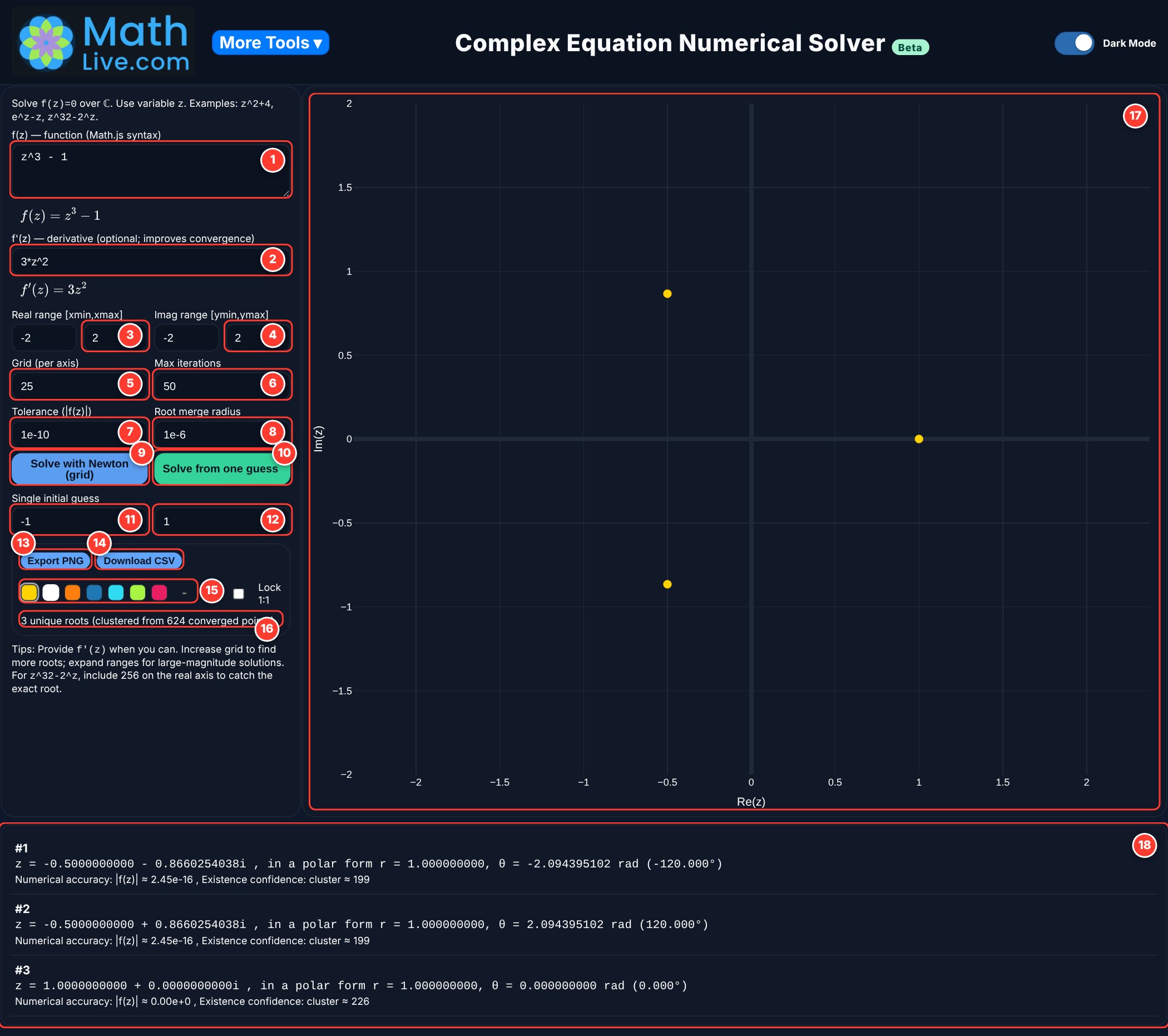
This guide explains how the MathLive Complex Equation Solver finds the roots of \(f(z)=0\), what every input and button does, and how to read the results. The red numbers on the screenshot match the numbered sections below.
How Newton’s method finds a root
Start from a guess \(z_0\). Newton’s method replaces the curve by its tangent line and jumps to where that line crosses zero. Repeating this gives
Close to a root, each step roughly doubles the number of correct digits, so a good guess reaches 10 or more correct digits in only a few steps.
A single guess finds only one root: the one it happens to lead to. That is why the solver starts Newton’s method from a whole grid of guesses spread over a rectangle of the complex plane, then collects the different roots it reaches.
Example: for \(z^3-1=0\), guesses lead to one of the three cube roots of unity, \(1\) and \(-\tfrac12 \pm \tfrac{\sqrt3}{2}i\). Which root a guess reaches depends on where it starts, and the regions of starting points that lead to each root (the “basins of attraction”) have famously intricate, fractal borders.
The solver also damps each step: if a full step would make \(|f(z)|\) bigger, it takes a shorter step instead. This keeps the search stable for difficult functions.
Function and derivative
Type your function using z as the variable. Examples: z^2 + 4, e^z - z, z^32 - 2^z, z^2 - (1+2*i).
Use * for multiplication, ^ for powers and i for the imaginary unit. Below the box, the solver shows your function in math form so you can check it.
If you type the exact derivative, Newton’s method uses it directly. This is usually faster and more reliable.
- Leave it blank and the solver works out the derivative itself.
- If that is not possible, it estimates the derivative numerically.
Example: for z^3 - 1, type 3*z^2.
Search region (for “Solve with Newton (grid)”)
The left and right edges of the rectangle where starting guesses are placed: the range of their real parts.
The solver starts at −50 to 50. In the screenshot it is −2 to 2, which covers \(\operatorname{Re}(z)\in[-2,2]\).
The bottom and top edges of the rectangle: the range of the imaginary parts of the starting guesses.
Roots far from the origin need a larger rectangle. If a root is found outside your range, the plot zooms out to show it.
Workload and accuracy
The number of starting guesses along each side of the rectangle. A grid of N gives N×N starting points (25 gives 625).
A bigger grid finds more roots but takes longer.
The most Newton steps allowed from each starting point.
Raise it if some roots are missed; keep it moderate to save time.
When \(|f(z)|\) falls below this number, \(z\) is accepted as a root.
Smaller means more accurate, but may need more iterations. The default \(10^{-10}\) is a good choice.
Many starting points end at the same root. Answers closer together than this distance are merged and counted as one root.
- Too small: the same root may be listed twice.
- Too large: two different roots may be merged.
Solve buttons
Runs Newton’s method from every point of the grid in your rectangle. This is the button to use for finding all the roots in view.
Runs Newton’s method from one starting point \(z_0\), set in boxes 11 and 12. Use it to see which root a particular starting point leads to.
Single initial guess
The real part of the starting point \(z_0\) for “Solve from one guess”.
The imaginary part of \(z_0\).
Example: for \(z^3-1=0\), starting at \(z_0=-1+i\) leads to the root \(-\tfrac12+\tfrac{\sqrt3}{2}i \approx -0.5+0.866i\).
Saving and display
Downloads a picture of the plot, for homework, notes or slides.
Downloads all the roots as a spreadsheet file (real part, imaginary part, r, θ in radians and degrees, \(|f(z)|\) and cluster count), ready for Excel or Google Sheets.
Pick the color of the root dots on the plot, or choose any color with the color picker at the end of the row.
How many different roots were found, and how many starting points reached a root (for example, “3 unique roots, clustered from 624 converged points”).
Reading the results
Each dot is a root, drawn on the complex plane: the real part across, the imaginary part up. Hover over or tap a dot to see its value. The plot can be zoomed and panned with the buttons at its top right.
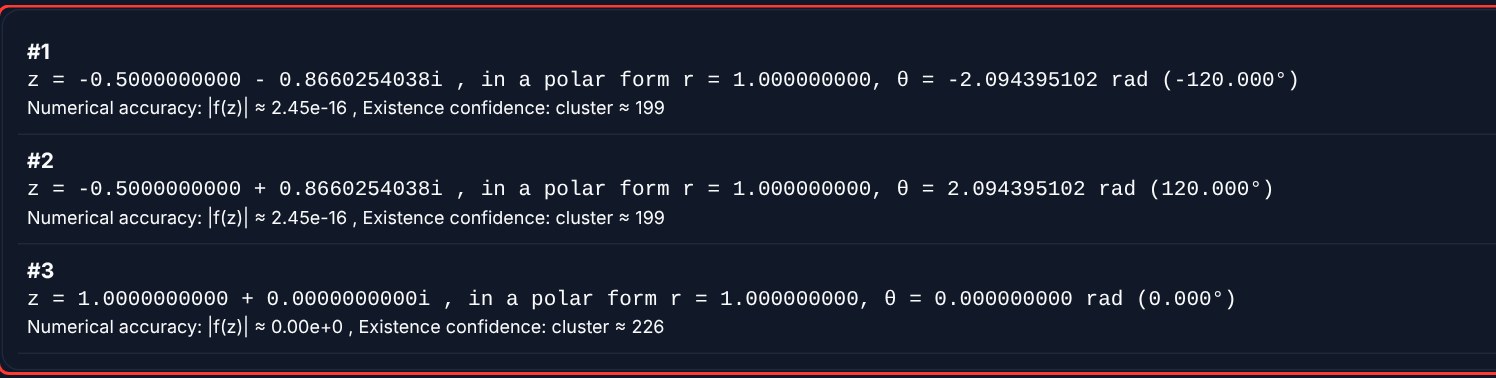
Every root is listed, numbered, in two forms:
- Rectangular: \(z = a + bi\).
- Polar: the distance \(r=\sqrt{a^2+b^2}\) from the origin and the angle \(\theta\) from the positive real axis, so \(z = r(\cos\theta + i\sin\theta)\).
Under each root, two numbers tell you how much to trust it:
- Numerical accuracy \(|f(z)|\): how close \(f\) is to zero at that point. Something like \(2.45\times10^{-16}\) means zero to about 16 decimal places: an excellent root.
- Existence confidence (cluster): how many starting points ended at this root. A large number means many paths agree. A root reached from only one or two starting points deserves a second look, for example with a bigger grid.
Quick tips
- Type f′(z) when you can, for faster and steadier convergence.
- Start with the default grid of 25. Increase it only if roots seem to be missing.
- If roots are very large or far apart, widen the ranges.
- If the same root appears twice, increase the merge radius slightly.
- Use “Solve from one guess” to explore which root a region of the plane leads to.